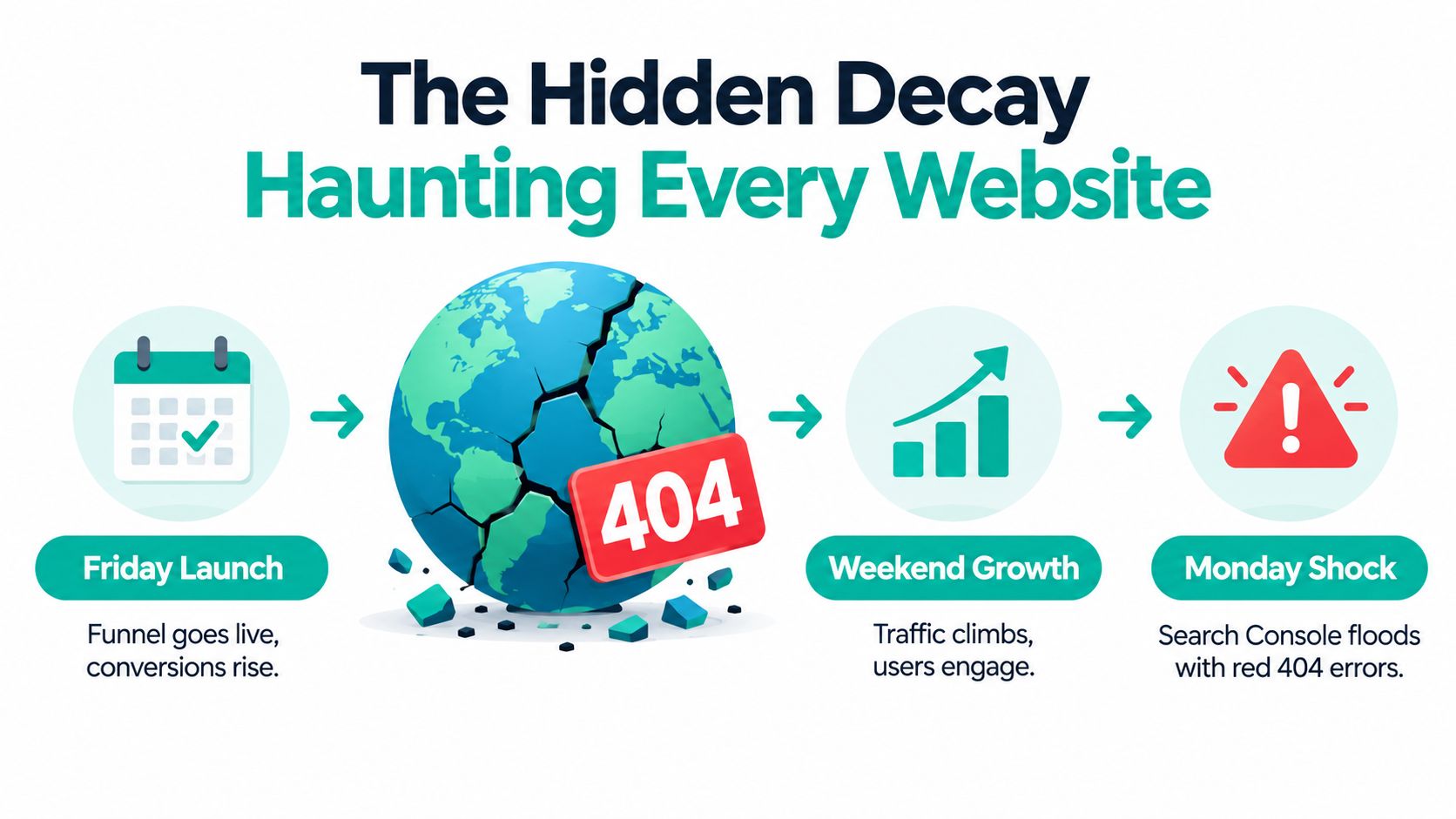
You launched the funnel on Friday. The pages looked polished, the buttons worked, and the first sales landed before dinner. Then Monday arrived, you opened Search Console, and a gremlin had rearranged the castle overnight. Red 404 errors stared back from URLs you'd swear were alive three days earlier.
That whiplash isn't bad luck. It's the normal weather of the web, and learning to fix broken links properly means treating that weather as a permanent condition, not a freak storm.
Table of Contents
- The Hidden Decay Haunting Every Website
- Mapping the Four Species of Broken Link
- Assembling the Detection Spellbook
- Choosing Between Restore, Redirect, or 404
- Casting the Fix - HTML, Redirects, and Replacements
- Automating Repair With a Nightly SEO Agent
- Keeping the Magic Sustainable
The Hidden Decay Haunting Every Website
A founder I picture in almost every cleanup has the same weekend. Friday's launch feels enchanted, Saturday's traffic climbs, Sunday brings the first proud screenshot for the team chat. Monday's crawl report breaks the spell.
Some of those errors are newborns from the launch itself. A slug changed during final edits, a thank-you page moved, an old campaign URL still sits in an email. Others were already rotting in blog posts nobody had touched in years.
The scale is documented, not anecdotal. A Pew Research Center study tracking pages from 2013 to 2023 found 25% of pages were no longer accessible by October 2023, and 38% of pages that existed in 2013 had disappeared, as summarized in the documented history of link rot and page disappearance. That same research found 54% of English-language Wikipedia pages carried at least one reference link to a page that no longer existed.
Why a Launch Audit Expires
Links don't fail once. They fail in waves as redesigns ship, domains lapse, products retire, and partners restructure their sites without telling you. Your own pages can stay perfectly intact while the destinations they point to vanish underneath them.
That's why broken links erode more than rankings. A dead link interrupts a buying journey, strands a reader mid-argument, and signals neglect to anyone deciding whether to trust you. It also wastes crawl attention that should go to live pages, which is why link health belongs beside sound crawling and indexing fundamentals rather than in a once-a-year tidy-up.
Practical rule: Treat every launch-day cleanup as the first casting of a recurring spell, not a permanent ward.
Budget for the ritual. The sites that stay clean aren't luckier, they're checked on a schedule.
Mapping the Four Species of Broken Link
Waving the same redirect wand at every error is how tidy audits turn into tangled sites. Four distinct creatures hide in a typical error report, and each wants a different remedy.
The Species in the Wild
An internal typo is the humblest beast. Someone typed /prcing instead of /pricing in a footer link, and the fix is correcting the source anchor, not adding a redirect to cover the mistake. Redirecting a typo you control leaves the error embedded in your HTML forever.
A moved URL is legitimate. The guide that lived at /blog/seo-tips now sits at /guides/seo, and every old reference deserves one clean hop to the new home. An intentionally retired page is different again. Last year's expired offer has no living equivalent, and pretending otherwise helps nobody.
Then there's the dead external reference, the species you can't control. Longitudinal research on New York Times articles found 25% of outbound deep links were completely inaccessible, including 43% of links from 2008, according to the Columbia Journalism Review analysis of link rot and content drift. More than half of articles with deep links held at least one rotted destination, even though the articles themselves never moved.
The Four Link-Failure Archetypes
| Archetype | Typical Cause | Default Move |
|---|---|---|
| Internal typo | Misspelled slug in your own HTML | Fix the anchor at its source |
| Moved URL | Redesign or restructure | Single direct 301 to the new location |
| Retired page | Offer ended, product discontinued | Genuine 404 or 410 if no equivalent exists |
| Dead external reference | Third-party page removed or changed | Replace with a successor or archived copy |
A link can also resolve successfully and still fail the reader when its destination has drifted into unrelated content.
Name the species first. The correct fix usually announces itself once you do.
Assembling the Detection Spellbook
Detection fails when teams rely on a single tool. A crawler sees your site as it is today, Search Console sees what Googlebot hit, and backlink data reveals dead pages that no internal link reaches anymore. You need all three scrying surfaces.
The Crawl Layer
Start with a full crawl in a tool like Screaming Frog or Sitebulb across HTML and relevant site sections. Capture every URL, its status code, and where it was found. A crawler alone won't catch orphaned dead URLs that still earn external links, which is why it opens the investigation rather than closing it.
Add the W3C Link Checker for the details crawlers gloss over. It validates whether links, including fragment identifiers, are dereferenceable, flags duplicate anchors, and warns about redirects, as described in the W3C Link Checker documentation on fragment and redirect validation. A page can return 200 while its #section anchor points at nothing, and only this kind of check catches that.
Here's the scrying setup that reveals what a surface scan misses.

Fields to Capture Per URL
- HTTP status and final destination: Record the full redirect chain, not just the first response.
- Source page and anchor text: You'll need both to repair the link in context and judge user intent.
- Canonical status: Confirm the target doesn't canonicalize elsewhere before you redirect anything.
- Referring domains: Note external sites still sending traffic or equity to the dead URL.
Reconciling the Sources
Merge crawler output with Search Console's 404 and 410 reports, server access logs, your XML sitemap, and backlink exports. Each source disagrees slightly, and the disagreements are informative. A URL in your logs but not your crawl is likely reached from outside. A URL in your sitemap returning 404 is an instruction you're giving Google to waste its time.
Layered tooling is also where a capable automated SEO tool earns its place, running the repetitive status checks so your judgment goes to classification instead of data collection. Recheck apparent failures before acting, because a temporary server hiccup looks identical to a genuine death on first sight.
Field note: If your audit spreadsheet can't tell you who links to a dead URL and what the anchor promises, it isn't finished.
Choosing Between Restore, Redirect, or 404
This decision determines whether your cleanup preserves equity or burns it. Most bad outcomes trace back to one reflex, redirecting everything somewhere, anywhere, to make the red numbers disappear.
Google's documented position is calmer than the panic suggests. 404 and 410 responses don't directly harm the rankings of your other valid pages, and zero 404s is not the goal, as laid out in the analysis of Google's guidance on broken links and SEO equity. Accurate information architecture is the goal.
The Decision Tree
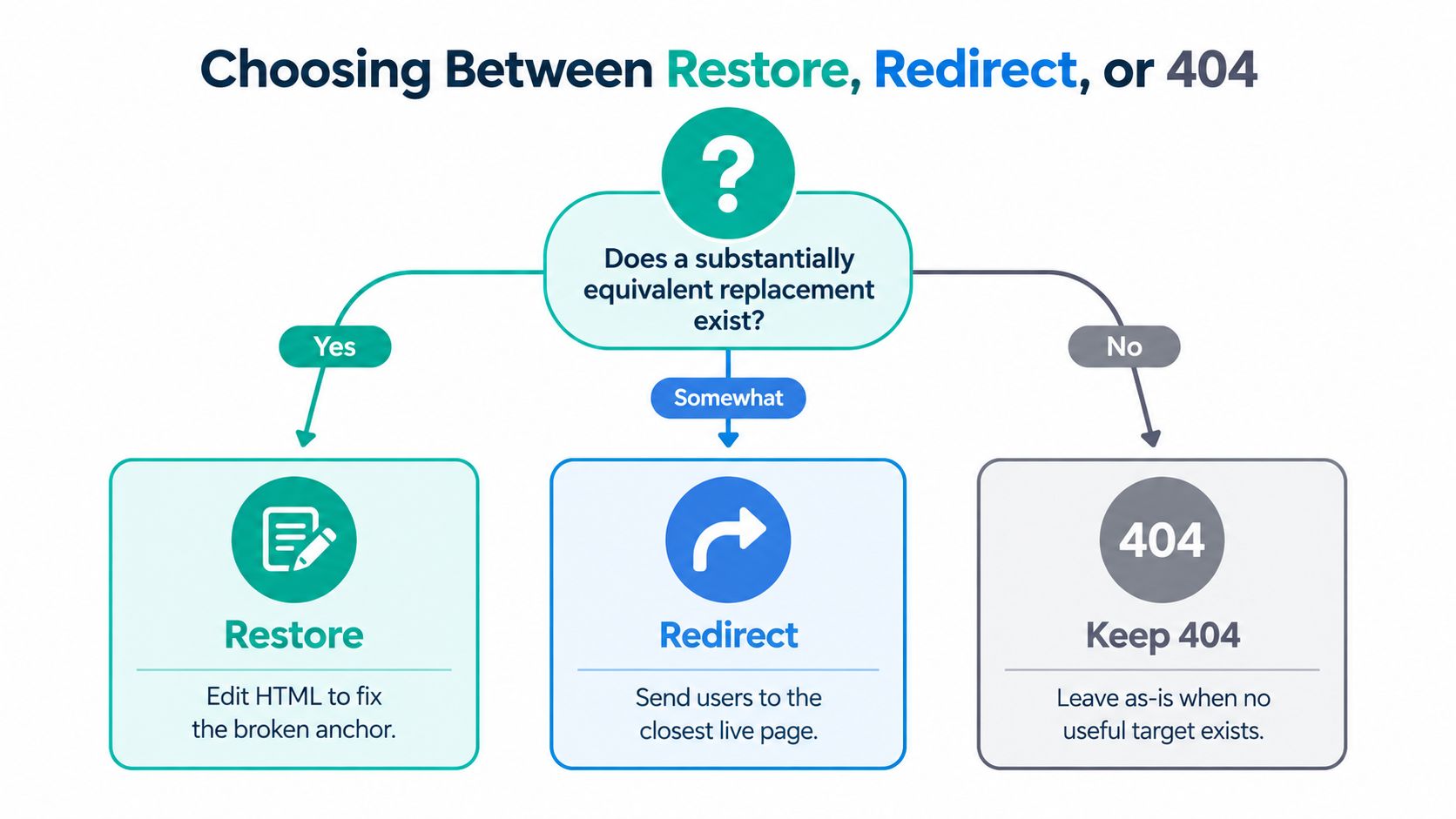
Ask whether a substantially equivalent replacement exists. If the content moved or a near-identical successor serves the same intent, deploy a single direct 301. A retired blue widget redirecting to its direct replacement model serves the visitor. The same widget redirecting to your homepage serves only your error count.
Ask next whether the dead page still earns something. Backlinks, branded search demand, or historical conversions argue for restoring the page at its original URL. Restoration recovers the full value because every existing reference works again without a single redirect hop.
If neither condition holds, let it return an honest 404, or a 410 when you're certain the content is gone for good. Never paper over retirement with a blanket homepage redirect. It confuses visitors who expected specific content and muddies the signals search engines use to understand your site structure.
Scoring What to Fix First
Raw error counts send engineering hours toward harmless dead ends. Score each broken URL instead with a simple priority formula.
- Referring domains: External links pointing at the dead URL represent recoverable equity.
- Organic visits: Historical traffic shows real demand existed.
- Conversion value: A dead checkout-adjacent page outranks a dead tag archive.
Multiply the three and work down the list. A URL scoring near zero on all three can stay 404 indefinitely without costing you anything measurable.
Defend every redirect with intent, not status codes. "It 404s" is never a sufficient reason to redirect.
That discipline is what separates a defensible redirect map from a junk drawer of guesses a future migration will inherit.
Casting the Fix - HTML, Redirects, and Replacements
With classification done, deployment splits into three casting motions. Mix them per failure rather than marching through them in order.
The In-Place HTML Edit
Your familiar should point at this track first whenever you control the source. Fix the typo, update the anchor to the new URL, or swap a dead external citation for an authoritative successor. When the original source matters as evidence, link an archived snapshot and label it transparently so readers know they're viewing a preserved copy.

Editing the source beats redirecting around it. Internal links pointing directly at live URLs pass users and crawlers through without an extra hop, and your HTML stays an honest map of your site. Check the replacement supports the claim the anchor text makes, because a topically adjacent page that doesn't back your sentence is a quieter kind of broken.
The Server-Level Redirect
For moved content, write one direct 301 from the old URL to the final destination. In Apache that lives in .htaccess, in nginx in your server block, and at the edge through a CDN like Cloudflare. The incantation details differ, the principle doesn't. One hop, correct target, no exceptions.
Chains are the classic self-inflicted wound. Page A redirects to B, which last year's migration already redirected to C, and now every visit pays two tolls. Loops are worse, bouncing visitors until the browser gives up. Test every rule after deployment, and be especially suspicious of wildcard patterns written in a hurry.
This walkthrough shows the redirect mechanics in practice before you touch production rules.
The Sitemap and Canonical Pass
- XML sitemaps: Remove dead URLs and confirm every listed URL returns 200.
- Canonical tags: Point them at live, final destinations, never at redirecting URLs.
- Hreflang pairs: Update both directions so language alternates don't reference retired pages.
Finish by rerunning the crawl and comparing it against your pre-fix export. Verify chains and loops are gone, test responses on mobile and desktop, and watch access logs for a few days. A fix you haven't verified is a hypothesis wearing a costume.
Deployment check: Every redirect you ship should be one you'd happily explain to the visitor who follows it.
Automating Repair With a Nightly SEO Agent
Manual audits decay the moment they finish, so the sustainable pattern is a nightly ritual. Think of it as a resident sprite with a checklist, crawling while you sleep and leaving a tidy report on the workbench by morning.
The model already exists in practice. Web Mage's SEO Seer runs as a nightly crawler that rewrites metadata, repairs broken links, and targets additional keywords, which makes it a concrete template for what an agent loop should attempt and where it should stop.
What to Automate, What to Keep Human
- Automate status checks: Recrawling known URLs, flagging new failures, and diffing against yesterday's results is pure repetition.
- Automate known-safe repairs: Deploying a pre-approved 301 for a documented move, or cleaning a dead URL from the sitemap, follows fixed rules.
- Keep replacement judgment human: Choosing whether a new source supports a cited claim is editorial work, not pattern matching.
- Keep anchor decisions human: Rewriting link text changes meaning, and an agent guessing at intent will eventually guess wrong in public.
That boundary matters more than the tooling. Setting up the loop well is largely a question of configuring dependable SEO automation software with clear guardrails, explicit approval queues for judgment calls, and alerts a human reads.
The Accessibility Blind Spot
Automation that only checks status codes misses failures that return 200. WebAIM's 2025 audit of the top one million home pages found one in ten skip links were broken because the target was missing or inaccessible, per the WebAIM Million 2025 accessibility report. A keyboard user hitting a skip link to nowhere experiences a broken link your crawler graded as healthy.
Build a human review pass into the ritual for high-value pages. Check that fragment targets exist, that linked headings are reachable, and that destinations work for screen-reader navigation. Verify each nightly run with Search Console diffs and a redirect-loop monitor, and log first-seen dates, final status codes, and replacement rationale for every change.
An agent that fixes fast and explains nothing will eventually fix something into a worse state than it found.
Keeping the Magic Sustainable
The mindset shift is the whole game. A pristine error report is a vanity metric, and chasing it produces the blanket redirects and soft 404s that damage sites. Google's guidance points the other way. A 404 is not harmful, every important page should have at least one internal link reaching it, and serving a not-found page with a 200 status impairs how search engines understand the site, as covered in the breakdown of Google's position on broken links and discoverability.
Four Habits That Outlast Any Tool
- Classify before you fix: The species determines the remedy, every time.
- Redirect by intent, not status: Equivalence earns a 301, retirement earns an honest 404.
- Archive before it vanishes: Snapshot high-value external references while they're still alive, and record why each replacement was chosen.
- Run the loop nightly: Small repairs on a schedule beat heroic annual cleanups that arrive a year too late.
Questions That Surface Afterward
How often should you recrawl? Match the cadence to how fast your site changes. A store rotating products weekly needs tighter loops than a stable documentation site, but monthly is a defensible floor for almost anyone, with a full crawl after every launch or migration.
What happens to legacy redirects after a migration? Audit them instead of stacking new rules on top. Collapse chains so every old URL lands on its final destination in one hop, and retire rules whose source URLs no longer receive traffic or links. An inherited redirect file nobody has reviewed is a dragon hoard of someone else's guesses.
Do broken external links hurt as much as internal ones? They hurt differently. A broken internal link can strand an important page with no path in for crawlers or users, which is a structural failure. A broken external link erodes the credibility of the page carrying it and wastes the reader's trust at the exact moment you asked them to verify you. Fix internal breaks for architecture, external breaks for reputation, and neither with panic.
The deeper win is preservation. Government pages, research citations, and public-interest references carry obligations beyond rankings. A link you maintain is evidence a future reader can still check, and a skip link that lands where it promises is access a keyboard user doesn't have to fight for. That's the standard worth enchanting toward, long after the error report goes quiet.
Ready to stop hunting 404 gremlins by hand every Monday? Web Mage builds your site or funnel from a plain-language prompt, then its resident agents patrol nightly to repair broken links, refresh metadata, and keep pages fast while you sleep. Visit today, describe the site you want, and let the maintenance magic run itself.